Tender alerts tell you when a public sector buyer publishes a notice that matches your search, so you do not have to check portals every day. Free official alerts exist and work well for some businesses. A paid service becomes worth considering when the time you spend filtering notices costs more than the subscription.
Checked against official guidance on 23 October 2026. Tenderpatch is not a legal adviser: always rely on the official notice and documents before you bid.
In this guide
What tender alerts do
A tender alert is an email or notification triggered by a saved search. You describe what you want, for example grounds maintenance within a region, and the service tells you when a matching notice appears. A good set of tender alerts saves you from repeating the same searches and helps you see new opportunities early.
The quality of alerts depends on two things: what the service covers and how precisely it filters. A wide search returns noise. A narrow one can miss notices that use different wording.
Free official tender alerts
The official services let you search for free and set up email notifications once you have an account.
- Find a Tender lets signed-in users save search criteria and sign up for email notifications. Searching and viewing opportunities is free.
- Contracts Finder says that you can create an account to get email updates and save searches, and you can search without one.
- For Northern Ireland, the Department of Finance explains how to register for eTendersNI email alerts.
Scotland and Wales run their own services: Public Contracts Scotland and Sell2Wales. Check each site for how to be notified of opportunities, as the arrangements differ.
Free alerts are an excellent starting point. They cost nothing, they come straight from the source and you learn how notices are written. The trade-off is time: you set up and maintain a set of searches on each portal, and you read every result to decide whether it is relevant.
What a paid tender alert service adds
A paid service typically sits on top of the same public notices and adds convenience. What it adds depends on the provider, so judge each service on what it demonstrably does for your trade rather than on a feature list.
Take Tenderpatch as an example. It reads new and changed notices from Find a Tender and sorts them by trade, using the buyer’s own codes and wording, then shows why a tender was matched. The features page lists what is included:
- Tenders matched to grounds maintenance, landscaping, arboriculture and tree surgery.
- A choice of the councils or regions you cover.
- A daily or weekly email digest, with no email on quiet days.
- Flags for closing dates that move and tenders that are cancelled.
- A tracker with a status, notes and an owner, and a closing-date reminder three days before the deadline.
- Up to 10 saved searches and up to 5 people on one account.
Tenderpatch costs £29 a month, or £290 a year, with every feature included, and it comes with a 14-day free trial that needs no card. Its coverage is Find a Tender: England, Wales and Northern Ireland. Scottish contracts below the main thresholds are published elsewhere and are not included yet.
Want a more focused way to follow relevant opportunities? Start your 14-day free trial. No card is needed and nothing is charged automatically.
Free versus paid at a glance
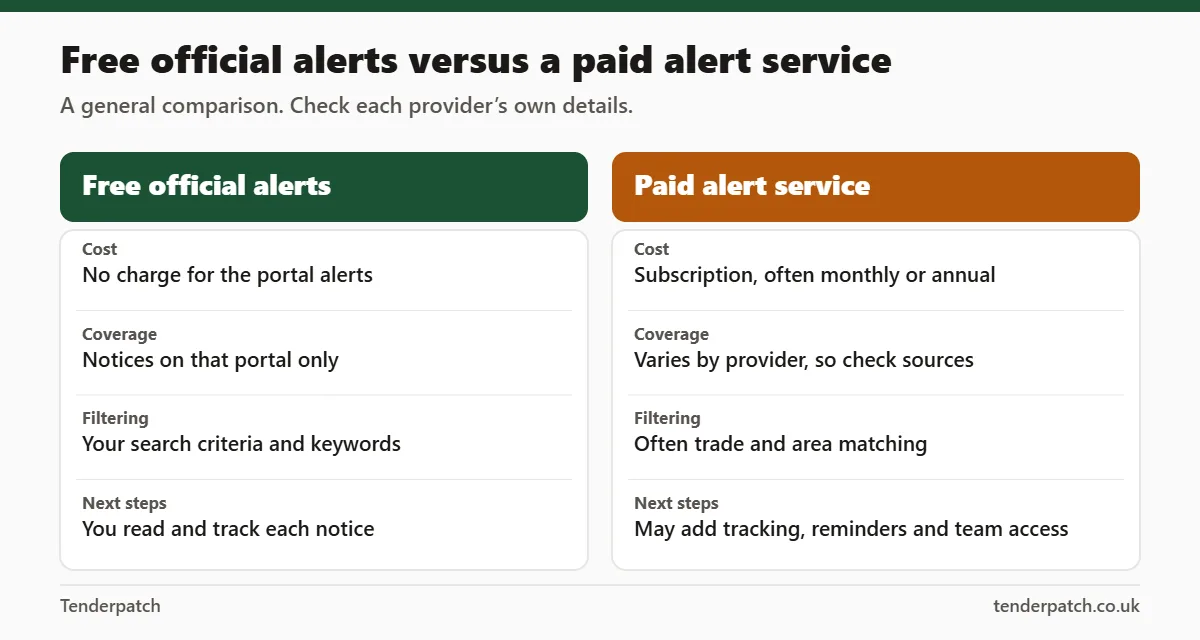
| Question | Free official alerts | Paid alert service |
|---|---|---|
| What do you pay? | Nothing | A subscription |
| Who sets up the searches? | You, on each portal | You, usually once, in one place |
| How precise is the filtering? | As precise as your keywords and the portal’s filters | Often matched by trade and area, and the reasons may be shown |
| What happens after the alert? | You read, record and track each notice yourself | Some services add tracking, reminders and a team workspace |
| How current is the data? | Direct from the portal | Depends on how often the provider reads the source, so check how up to date it is |
| What is the risk? | Missing notices that use unexpected wording | Paying for coverage you do not need, or assuming it covers every source |
How to choose
Ask yourself five honest questions:
- How many hours a week do I spend searching and reading notices?
- Are my trades and patch easy to describe with keywords, or do buyers use varied wording?
- Do I lose track of closing dates and changes?
- Do others in my business need to see the same opportunities?
- Which portals actually publish the work I bid for?
If you spend more than a short time a week on searches and the results are noisy, a service that filters by trade and region can pay for itself, but only if the contracts it finds are ones you can win. If your searches are simple and few opportunities are published, free alerts may be enough.
The GOV.UK guide to the Procurement Act for suppliers says you can set up alerts for tenders that interest you on Find a Tender, so there is no cost to starting there while you test how often relevant notices appear.
Getting the most from any alert
- Use several wording variants: “grounds maintenance”, “grass cutting”, “landscaping”, “tree works”, “arboricultural”.
- Check lots. A relevant lot can sit inside a wider estate services contract.
- Read the notice type. Pipeline, planned and award notices are not live invitations to bid.
- Record closing dates and clarification deadlines straight away.
- Review and refine alerts each month. Remove irrelevant keywords and add ones you learn from notices.
Frequently asked questions
Are there free tender alerts?
Yes. Find a Tender and Contracts Finder both offer email updates once you have an account, and other portals have their own arrangements. Search for each portal’s alert instructions.
Do I need paid tender alerts?
Not necessarily. Paid tender alerts help most when you spend a lot of time sorting notices, want deadline reminders and tracking, or need several people to follow the same opportunities.
Do paid services cover every tender?
No service can promise every tender. Check which sources a provider reads, and always open the official notice before deciding to bid.
Does Tenderpatch need a card for the trial?
No. The 14-day free trial needs no payment card or payment details, and nothing is charged automatically. If you do nothing, the account becomes read-only when the trial ends.
For help choosing where to search, read where to find UK public sector tenders and see how Tenderpatch works.
Find Relevant UK Tenders with Tenderpatch
Discover public-sector contract opportunities relevant to your business and explore Tenderpatch’s tender-alert service, with matches shown by trade and by patch. Start your 14-day free trial and see how it can simplify your tender search. No card is needed and nothing is charged automatically.
This guide is general information, not legal or procurement advice. Rules and thresholds change: check the official notice and current government guidance before you bid.